
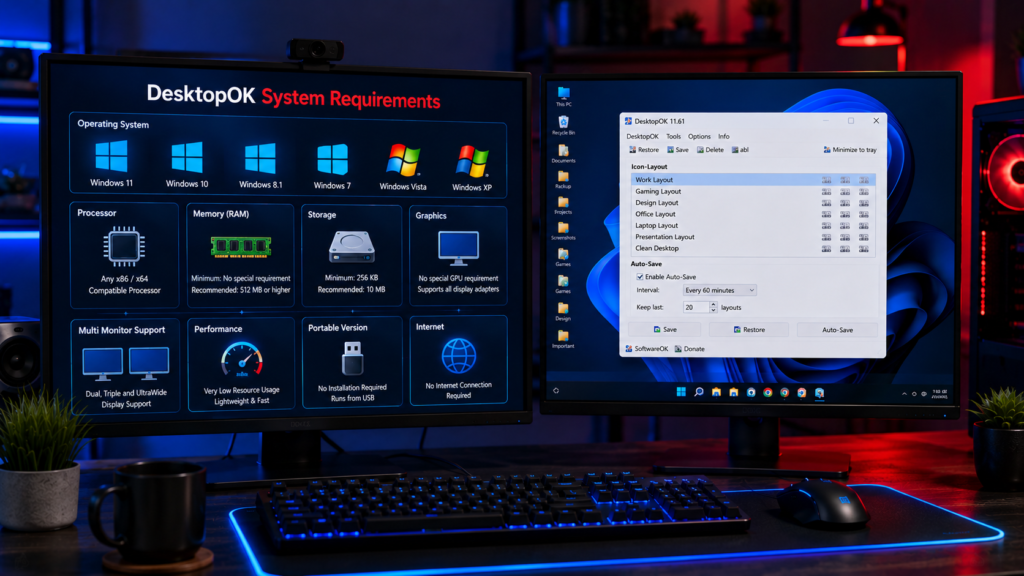
DesktopOK system requirements are simple, and that is part of the appeal. The program is a small, portable Windows utility that saves and restores desktop icon layouts. It runs on any Windows PC, from older machines to new Windows 11 systems. You do not need a powerful computer to use it.
This guide explains exactly what DesktopOK needs to run well. It covers supported Windows versions, 32-bit and 64-bit support, memory and storage, and permissions. Everything here comes from the details published on this site. Read on to check your PC in a few minutes.
Supported Windows Versions
DesktopOK supports a wide range of Windows versions. The list starts with Windows XP and Windows Vista and runs through Windows 7, 8, 8.1, 10 and 11. Windows Server editions are supported too. That broad support makes it useful on both home PCs and office computers.
Older versions are not left behind. If your PC still runs Windows 7 or Windows 8, DesktopOK will work on it. The same small program covers the full range. You do not need a different version for each Windows release.
Windows 11 and Windows 10
Windows 11 and Windows 10 are fully supported. DesktopOK works with the current releases and with common updates. It saves icon layouts after screen changes, resolution switches and system updates. Your desktop stays tidy on modern systems.
On Windows 11, DesktopOK handles multi-monitor setups and high-resolution screens. It restores icon positions after display changes. That matters when you dock a laptop or change monitors. The tool is light enough to run in the background.
Windows 8, 8.1 and Windows 7
Windows 8, Windows 8.1 and Windows 7 are supported as well. These versions are still found on many home and work PCs. DesktopOK runs on them without extra setup. Icon layouts save and restore just as they do on newer Windows.
If you use Windows 7, check that your system is up to date. DesktopOK needs only a working Windows install. No extra software is required for these versions either. The program stays small and fast on older hardware.
Windows XP, Vista and Windows Server
Windows XP and Windows Vista are also listed as supported. DesktopOK keeps working on these older systems. That is helpful for PCs that cannot move to a newer Windows version. The utility places almost no demand on the machine.
Windows Server editions are supported too. DesktopOK can run on server systems used as workstations. It saves icon layouts for each user profile. Server users get the same simple behaviour as desktop users.
32-Bit and 64-Bit Support
DesktopOK supports both 32-bit and 64-bit Windows. The download includes builds for x86 and x64 systems. You simply pick the build that matches your PC. Both builds offer the same features and the same small size.
Most modern PCs run 64-bit Windows, while older machines may run 32-bit Windows. DesktopOK covers both cases. Check your system type in Settings before you download. The download page lists both builds side by side.
Memory, Storage and File Size
DesktopOK is tiny. The program file is around 606 KB, according to the technical details on this site. It needs only 256 KB of free disk space. That is far less than most Windows programs, and it leaves your drive almost untouched.
Memory use is just as light. The site lists no special RAM requirement for DesktopOK. It runs well on PCs with modest memory. There is no graphics card requirement either. Any standard Windows PC can run it without strain.
| Requirement | Details |
| Operating system | Windows XP, Vista, 7, 8, 8.1, 10, 11 and Windows Server |
| Architecture | 32-bit (x86) and 64-bit (x64) |
| File size | Around 606 KB |
| Free disk space | 256 KB |
| Memory (RAM) | No special RAM requirement |
| Graphics | No dedicated graphics card needed |
| Internet | Not required to run |
| Installation | None, portable program |
No Installation Required
DesktopOK needs no installation. You download the file, unzip it and run the program. There is no setup wizard and no restart. The program does not write itself into your system folders. You can start using it in under a minute.
Because there is no installer, removing DesktopOK is just as easy. Delete the program folder and it is gone. No leftover services keep running. That makes it a clean choice for shared PCs and work computers.
Running DesktopOK from a USB Drive
DesktopOK is portable, so it runs from a USB drive. Copy the folder to the drive and launch it on any supported Windows PC. Your saved icon layouts travel with you. This is ideal for technicians and multi-PC users.
Portable use needs no extra steps. The program stores its settings in its own folder. Plug the drive into another PC and your layouts are there. Nothing is installed on the host computer.
No Extra Runtimes or Frameworks
DesktopOK needs no extra runtime or framework. The download is a standalone program that runs on its own. You do not need to install .NET, Java or any other platform first. Windows already provides everything it needs.
That keeps setup simple and avoids version conflicts. There is nothing extra to update or repair later. If Windows runs, DesktopOK runs. This is one reason the program stays so small and reliable.
Administrator Rights
Administrator rights are not required for normal use. You can run DesktopOK as a standard user. Saving and restoring icon layouts works without elevated rights. That suits school, office and shared computers.
Some system folders may still ask for permission on managed PCs. For everyday use, that is rarely an issue. Your own desktop and icon layouts are fully under your control. DesktopOK works within normal user rights.
How to Check Your Windows Version
Before you download, check which Windows version you run. Open Settings, then System, then About. Your edition and version appear there. You will also see whether your system is 32-bit or 64-bit.
Match that detail to the download options. The download page offers both 32-bit and 64-bit builds for supported Windows versions. Pick the build for your system and you are ready. For safety notes, see our guide on whether DesktopOK is safe to download and use on Windows.
Conclusion
DesktopOK system requirements are modest by design. Any supported Windows PC, from XP to Windows 11, can run it. It needs little disk space, no special memory and no extra software. Both 32-bit and 64-bit systems are covered.
Download the build that matches your PC and start saving your icon layouts today. If you are new to the tool, start with what DesktopOK is and how it works. Your desktop will stay organised after every restart and update.
Pingback: What Is DesktopOK? Features, Uses & How It Works