
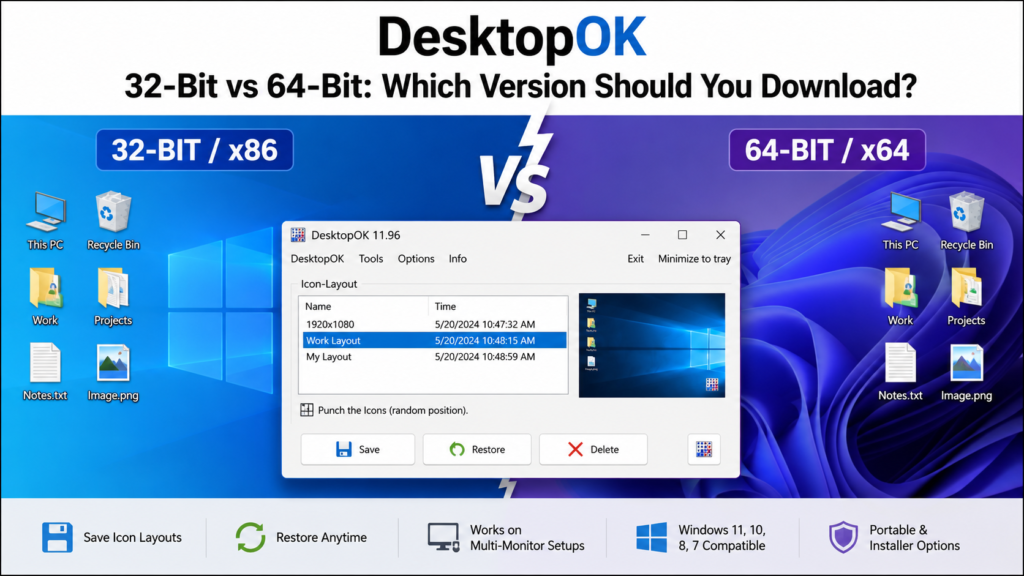
Choosing between DesktopOK 32-bit and 64-bit can be confusing because the download page provides several packages, including regular, Unicode, installer, portable, and x64 versions. The correct choice depends mainly on your Windows system type and whether you prefer an installed or portable application.
Most modern computers run 64-bit Windows, while some older systems still use a 32-bit operating system. Although both DesktopOK versions provide the same essential desktop icon-saving features, downloading the correct architecture can improve compatibility and prevent startup errors.
This guide compares DesktopOK 32-bit vs 64-bit, explains every available package, and shows you how to check your Windows architecture before downloading.
Quick Answer: Which DesktopOK Version Should You Download?
Use the following recommendation if you need a fast answer:
| Your Windows system | Recommended DesktopOK version |
|---|---|
| Windows 11 | DesktopOK_x64.zip or DesktopOK_Installer_x64.zip |
| Windows 10 64-bit | DesktopOK_x64.zip |
| Windows 10 32-bit | DesktopOK.zip or DesktopOK_Unicode.zip |
| Windows 8 or 7 64-bit | DesktopOK_x64.zip |
| Windows 8 or 7 32-bit | DesktopOK.zip or DesktopOK_Unicode.zip |
| Unsure about system type | DesktopOK.zip or DesktopOK_Unicode.zip |
| Need a portable version | DesktopOK_x64.zip or DesktopOK_Unicode.zip |
| Need an installed version | DesktopOK_Installer_x64.zip or DesktopOK_Installer.zip |
The regular DesktopOK and Unicode packages are intended to work across supported 32-bit and 64-bit Windows systems. Packages containing “x64” in their names require a 64-bit Windows operating system. Do 32-Bit and 64-Bit Mean?
The terms 32-bit and 64-bit refer to the architecture used by your processor, operating system, and applications. A 64-bit system can manage larger amounts of memory and is the standard architecture used by most modern Windows computers.
A 32-bit operating system is generally found on older computers with limited hardware. It cannot run applications developed exclusively for 64-bit Windows. A 64-bit operating system can normally run compatible 32-bit programs as well as native 64-bit applications.
Windows 11 is available only as a 64-bit operating system. Therefore, every Windows 11 computer should use a compatible 64-bit DesktopOK package when possible. DesktopOK 32-Bit vs 64-Bit Comparison
The following table explains the main differences between the two versions.
| Feature | DesktopOK 32-Bit | DesktopOK 64-Bit |
|---|---|---|
| Architecture | x86 or universal Windows build | Native x64 build |
| Windows 11 support | May run through compatibility support | Recommended |
| Windows 10 support | 32-bit and compatible 64-bit systems | 64-bit systems only |
| Older Windows support | Better choice for older 32-bit computers | Requires 64-bit Windows |
| Core icon layout features | Included | Included |
| Portable package | Available | Available |
| Installer package | Available | Available |
| Memory requirements | Very low | Very low |
| Recommended user | Older or uncertain systems | Modern 64-bit computers |
| Filename indicator | No x64 label | Includes x64 in filename |
Both versions can save and restore desktop icon layouts. The major difference is system architecture rather than the core purpose of the application. The developer’s documentation states that all available versions provide desktop icon layout-saving functionality. Understanding the Available DesktopOK Download Files
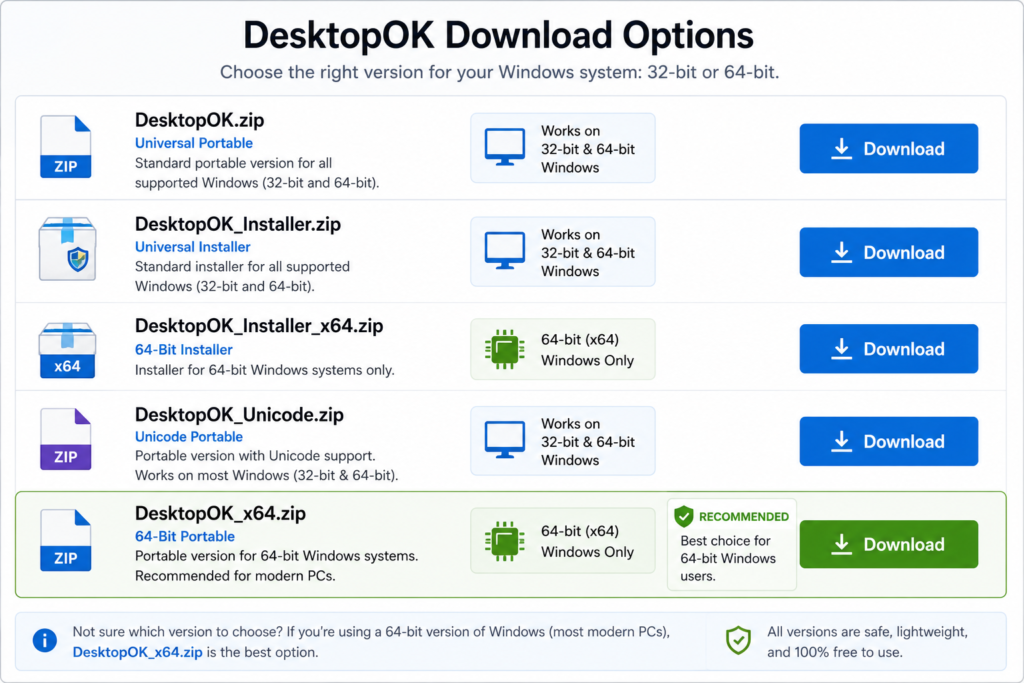
DesktopOK provides multiple packages. The filenames may appear complicated, but each package serves a specific type of user.
DesktopOK.zip
DesktopOK.zip is the regular portable package. It can be extracted and launched without completing an installation wizard.
This version is a practical choice when:
- You are unsure whether Windows is 32-bit or 64-bit.
- You want to run DesktopOK without installation.
- You are using an older Windows computer.
- You need a lightweight version for occasional use.
The official download page describes the regular package as a standard Windows download, while the dedicated x64 package is separately identified for 64-bit Windows. topOK_x64.zip
DesktopOK_x64.zip is the portable version developed specifically for 64-bit Windows systems.
Choose this package when:
- Your computer runs 64-bit Windows.
- You want the native x64 application.
- You do not want to install the program.
- You want to keep DesktopOK on a USB drive or external storage device.
The developer recommends DesktopOK_x64.zip for 64-bit Windows systems. It should not be used on a 32-bit operating system. topOK_Installer.zip
DesktopOK_Installer.zip provides the standard installation package. It is suitable for users who want DesktopOK added to their computer like a traditional Windows application.
The installed version may be more convenient when you use DesktopOK regularly and want easier access from Windows shortcuts.
DesktopOK_Installer_x64.zip
DesktopOK_Installer_x64.zip is the installed version for 64-bit Windows.
Select this package when:
- You have confirmed that Windows is 64-bit.
- You prefer an installed application.
- You want permanent access from your computer.
- You do not need to carry the program between systems.
This package cannot run on a 32-bit version of Windows because it is designed specifically for x64 systems. topOK_Unicode.zip
DesktopOK_Unicode.zip is a portable package with improved support for international and special characters.
It is useful when:
- Desktop icon names contain non-English characters.
- You work with multilingual filenames.
- You need a portable version compatible with different computers.
- You are uncertain about the system architecture.
The developer describes the Unicode package as a portable version suitable for supported 32-bit and 64-bit systems. o Check Whether Windows Is 32-Bit or 64-Bit
Before downloading DesktopOK, check the System type displayed by Windows.
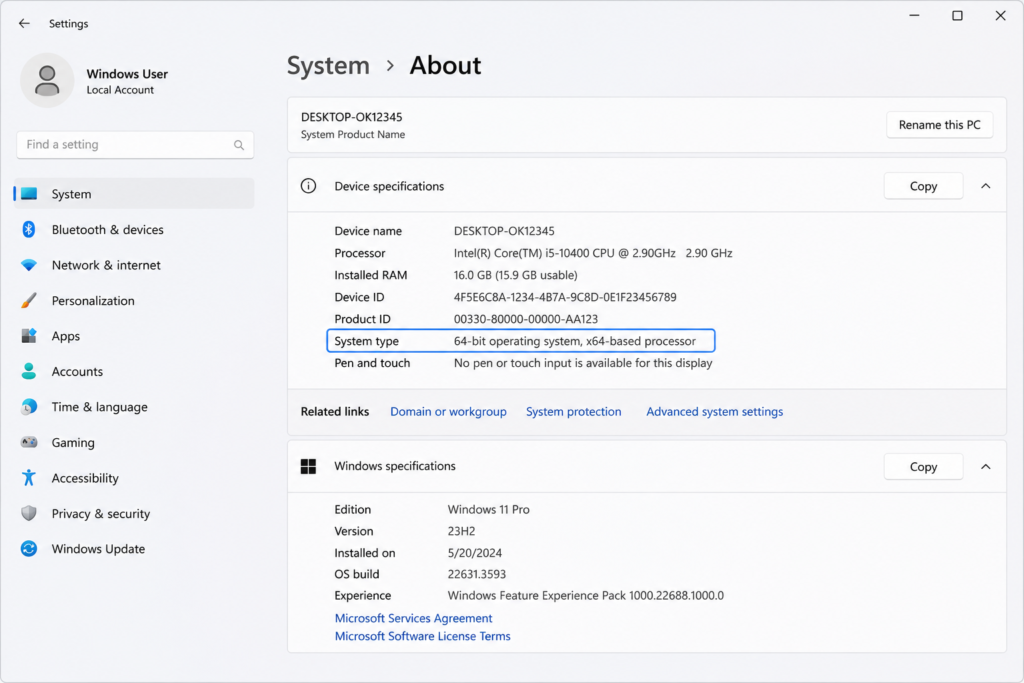
Check System Type on Windows 11
- Open the Start menu.
- Select Settings.
- Open System.
- Select About.
- Find System type under Device specifications.
Windows 11 is 64-bit only, but the System type section can also confirm whether the computer uses an x64-based or ARM-based processor. k System Type on Windows 10
- Press
Windows + Ito open Settings. - Select System.
- Open About.
- Scroll to Device specifications.
- Check the information beside System type.
You may see one of these results:
64-bit operating system, x64-based processor
Download DesktopOK_x64.zip or DesktopOK_Installer_x64.zip.
32-bit operating system, x86-based processor
Download DesktopOK.zip, DesktopOK_Installer.zip, or DesktopOK_Unicode.zip.
32-bit operating system, x64-based processor
Your processor supports 64-bit software, but the installed Windows operating system is 32-bit. You must use the regular DesktopOK package unless Windows is replaced with a 64-bit installation.
Microsoft confirms that the architecture version can be found beside System type under Device specifications. k System Type Through Control Panel
You can also use the traditional Control Panel method:
- Open Control Panel.
- Select System and Security.
- Open System.
- Find the System type information.
This method is particularly helpful on Windows 7 and Windows 8 computers.
Should You Choose DesktopOK 64-Bit on a Modern PC?
DesktopOK 64-bit is normally the better choice for a modern computer running 64-bit Windows. It matches the operating system architecture and is intended for current x64 hardware.
However, DesktopOK is a very small desktop utility. It does not process large video files, complex databases, or memory-intensive projects. Therefore, users should not expect a dramatic visual speed difference between the regular and x64 editions during basic icon layout operations.
The main benefit of choosing the x64 version is native compatibility with your 64-bit Windows installation. The official DesktopOK guidance also recommends its x64 package for computers running 64-bit Windows. DesktopOK 32-Bit Run on 64-Bit Windows?
The regular DesktopOK package is designed to support compatible 32-bit and 64-bit Windows environments. This makes it a useful fallback when you do not know the computer’s architecture or need to carry the same portable package between different systems. When you know that a computer runs 64-bit Windows, using DesktopOK_x64.zip is the more direct choice.
The opposite situation is different: a native 64-bit application cannot run on a 32-bit operating system. Attempting to open DesktopOK_x64.exe on 32-bit Windows may produce a compatibility or application error.
Does the 64-Bit Version Have More Features?
The 32-bit and 64-bit editions provide the same essential DesktopOK functions, including:
- Saving current desktop icon positions
- Restoring previously saved layouts
- Managing multiple desktop arrangements
- Supporting different screen resolutions
- Helping with multi-monitor layout changes
- Providing portable and installed usage options
Choosing 64-bit does not unlock an additional premium feature set. The architecture mainly determines which Windows environment can launch the application correctly.
The developer confirms that all versions save desktop icon layouts and that the primary difference between portable and installed packages is the setup method. ble vs Installer: Which Format Is Better?
Architecture and installation format are separate decisions. After choosing between 32-bit and 64-bit, you must decide whether to use the portable or installed package.
Choose the Portable Version When:
- You do not want to install additional software.
- You need to run DesktopOK from a USB drive.
- You manage multiple computers.
- You want to keep the application and its files together.
- You only use DesktopOK occasionally.
Choose the Installer Version When:
- DesktopOK will be used regularly on one computer.
- You prefer a standard Windows installation.
- You want easier access through shortcuts.
- You do not plan to transfer the application between devices.
The portable and installed versions provide the same main functionality. Their difference is primarily how the program is stored and launched. Happens If You Download the Wrong Version?
Downloading the wrong architecture does not normally damage the computer, but the application may fail to start.
If You Run the 64-Bit Version on 32-Bit Windows
Windows may display an error saying that the application cannot run on your PC or is incompatible with the current Windows version.
To fix it:
- Delete the extracted x64 package.
- Download DesktopOK.zip or DesktopOK_Unicode.zip.
- Extract the new archive.
- Run the regular executable.
If You Run the Regular Version on 64-Bit Windows
The regular package may still work because it is intended to support compatible 32-bit and 64-bit Windows systems. You can continue using it or switch to DesktopOK_x64.zip for a native 64-bit build. Recommended Version for Different Users
Home Users
Most home users with Windows 11 or modern Windows 10 computers should select DesktopOK_x64.zip. It is portable, lightweight, and does not require a traditional installation.
Users With Older Computers
Users running 32-bit Windows 7, Windows 8, Windows Vista, or another older system should choose the regular or Unicode package.
IT Technicians
DesktopOK_Unicode.zip can be helpful for technicians because it is portable and suitable for use across different supported system architectures.
Technicians who know that all managed computers are 64-bit can instead use DesktopOK_x64.zip.
Multi-Monitor Users
Multi-monitor users can select either architecture according to their Windows system type. The important step is saving separate layouts after monitors, scaling, and resolutions have been configured correctly.
Gamers
Gamers running Windows 11 or 64-bit Windows 10 should normally choose DesktopOK_x64.zip. They can save a layout before starting games that change screen resolution and restore it afterward.
Common DesktopOK Version Selection Mistakes
Choosing x64 Because the Computer Has 64-Bit Hardware
A computer can have an x64-capable processor while still running a 32-bit Windows installation. Check the operating system type, not only the processor architecture.
Confusing Portable With 32-Bit
Portable does not automatically mean 32-bit. DesktopOK_x64.zip is both portable and 64-bit.
Assuming Installer Means Better Performance
The installer and portable versions offer the same main functions. Installation mainly affects convenience and file placement.
Downloading an x64 Package for a 32-Bit System
Files containing “x64” in the name require 64-bit Windows. Use the regular or Unicode package on a 32-bit operating system.
Ignoring the System Type Information
Checking Windows System type takes less than a minute and prevents most architecture-related download errors.
Frequently Asked Questions
Is DesktopOK 32-bit still available?
Yes. The regular and Unicode packages support users who need compatibility with supported 32-bit Windows systems. h DesktopOK version is best for Windows 11?
DesktopOK_x64.zip is generally the best portable choice because Windows 11 is a 64-bit operating system. Users who prefer installation can select DesktopOK_Installer_x64.zip. I use DesktopOK_x64 on Windows 10?
Yes, provided your Windows 10 installation is 64-bit. Check Settings, System, About, and System type before downloading.
Can DesktopOK_x64 run on 32-bit Windows?
No. DesktopOK_x64 is developed specifically for 64-bit Windows and should not be selected for a 32-bit operating system. esktopOK Unicode the same as the 64-bit version?
No. DesktopOK_Unicode.zip focuses on portable use and improved support for international characters. DesktopOK_x64.zip is specifically built for 64-bit Windows. he portable version slower than the installer version?
For normal desktop icon saving and restoration, users should not expect a meaningful difference. The main distinction is whether the application runs directly from an extracted folder or is installed on the computer.
Do both versions save the same icon layouts?
Yes. All DesktopOK versions provide the core ability to save and restore desktop icon positions. I switch from 32-bit DesktopOK to 64-bit DesktopOK?
Yes. You can close the regular version, download the x64 package, extract it, and start the 64-bit executable. Keep a backup of important saved layouts before replacing or reorganizing application files.
Which version should I choose when I am unsure?
Choose DesktopOK.zip or DesktopOK_Unicode.zip. These packages provide broader compatibility across supported Windows systems. Recommendation
DesktopOK 32-Bit vs 64-Bit selection is straightforward once you know your Windows System type. Users running Windows 11 or another 64-bit version of Windows should normally download DesktopOK_x64.zip for portable use or DesktopOK_Installer_x64.zip for a traditional installation.
Users with 32-bit Windows should select DesktopOK.zip, DesktopOK_Installer.zip, or DesktopOK_Unicode.zip. When the system architecture is unknown, the regular or Unicode package is the safer compatibility choice.
Regardless of the version selected, DesktopOK provides the same essential purpose: saving desktop icon arrangements and restoring them when Windows updates, resolution changes, games, remote sessions, or monitor adjustments move icons from their preferred positions.