
DesktopOK is one of the most lightweight desktop management tools available for Windows users. Unlike many modern applications that require significant system resources, DesktopOK was designed to work efficiently on both older and newer computers.
Whether you use Windows 11 on a modern workstation or Windows 7 on an older machine, DesktopOK can help you save and restore desktop icon layouts without affecting system performance.
This DesktopOK System Requirements Guide explains the hardware, software, and operating system requirements needed to run DesktopOK smoothly.
Quick Info
Software: DesktopOK
Developer: SoftwareOK
License: Freeware
Platform: Windows
Website Note: DesktopOK.net is an independent informational guide. DesktopOK is developed by SoftwareOK.
What Is DesktopOK?
DesktopOK is a desktop utility developed by SoftwareOK that allows users to save and restore desktop icon positions.
The software helps users recover icon layouts after:
- Resolution changes
- Windows updates
- Multi-monitor configuration changes
- Remote Desktop sessions
- Graphics driver updates
Its lightweight design makes it suitable for nearly every Windows computer.
DesktopOK Basic Requirements
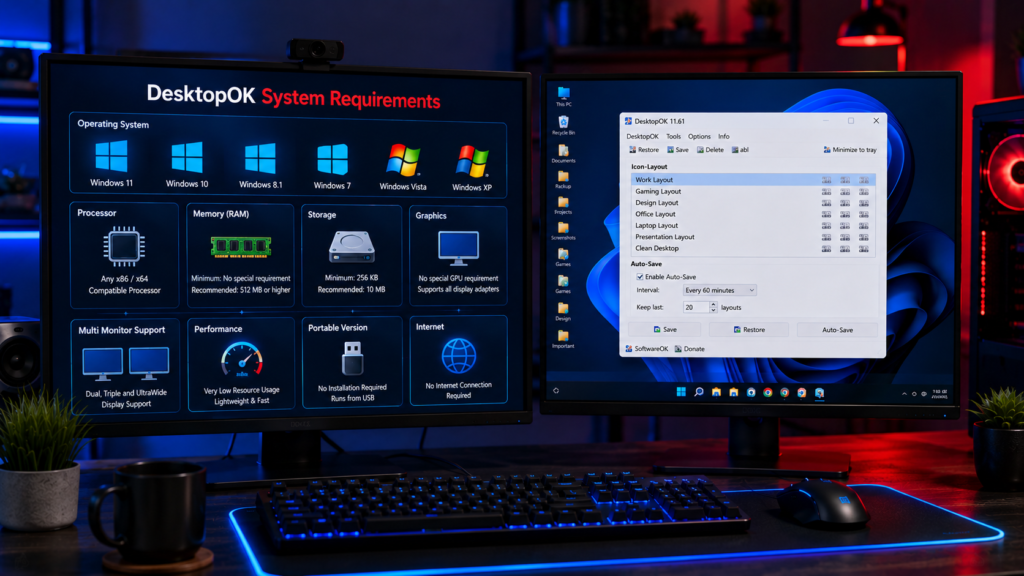
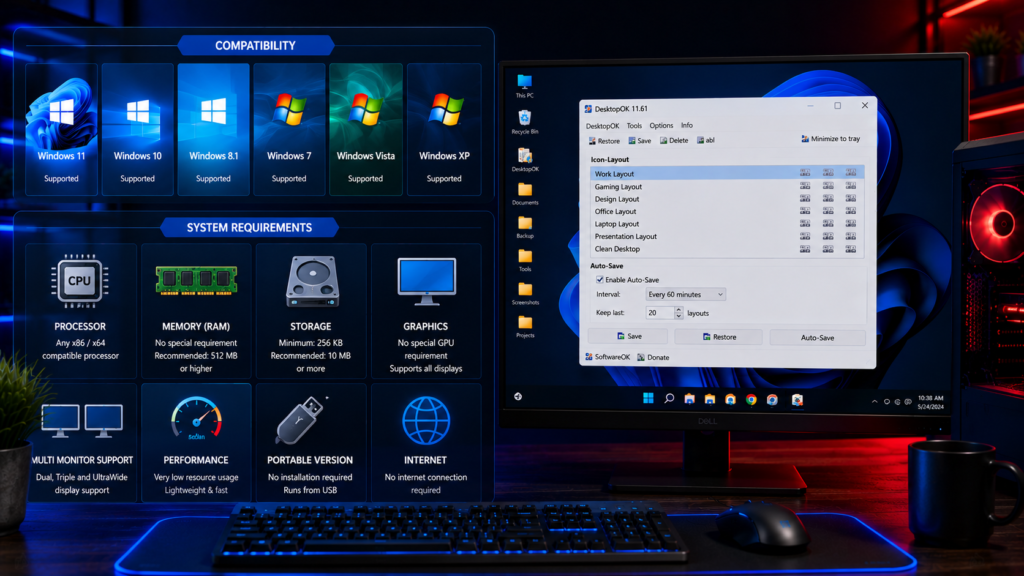
DesktopOK is a lightweight Windows utility. It can run on modern Windows computers and does not need heavy storage, high RAM, or a powerful processor for normal use. Users should still verify the latest file details before downloading any software.
Minimum System Requirements
DesktopOK was created to use minimal system resources.
Operating System
DesktopOK supports:
- Windows 11
- Windows 10
- Windows 8.1
- Windows 8
- Windows 7
- Windows Vista
- Windows XP
This broad compatibility makes it one of the few desktop utilities that still supports older Windows versions.
Processor
Minimum requirement:
- Any x86 or x64 compatible processor
Examples include:
- Intel Core series
- Intel Pentium
- Intel Celeron
- AMD Ryzen
- AMD Athlon
- AMD FX processors
DesktopOK does not require a high-performance CPU.
Memory Requirements
Minimum RAM:
- No special RAM requirements
Recommended:
- 512 MB RAM or higher
Since DesktopOK only manages desktop icon positions, memory usage remains extremely low.
Storage Requirements
Required free disk space:
- Approximately 256 KB
This makes DesktopOK significantly smaller than most modern Windows applications.
Graphics Requirements
DesktopOK has no dedicated GPU requirements.
Supported:
- Integrated graphics
- Dedicated graphics cards
- Single monitor systems
- Multi-monitor systems
The software works with nearly any display configuration.
Recommended System Requirements
For the best experience, the following specifications are recommended:
Operating System
- Windows 11
- Windows 10
Processor
- Dual-core processor or higher
Memory
- 4 GB RAM or higher
Storage
- 10 MB free space
Display
- Full HD monitor or higher
These specifications ensure optimal performance, especially for users managing multiple monitors.
DesktopOK on Windows 11
DesktopOK works exceptionally well on Windows 11.
Benefits include:
- Full compatibility with Windows 11 updates
- Support for multiple displays
- Improved DPI scaling handling
- Better desktop layout restoration
Users running Windows 11 can take advantage of all current DesktopOK features.
DesktopOK on Windows 10
Windows 10 remains one of the most popular operating systems for DesktopOK users.
The software supports:
- Standard desktop layouts
- Multi-monitor setups
- Automatic backups
- Resolution-specific profiles
Performance remains excellent even on older Windows 10 hardware.
Multi Monitor Requirements
DesktopOK supports:
- Dual monitor setups
- Triple monitor setups
- Ultrawide displays
- Mixed resolution environments
No additional hardware requirements are necessary.
The software automatically detects connected monitors and saves corresponding layouts.
Portable Version Requirements
DesktopOK Portable has identical system requirements.
Advantages include:
- No installation required
- Runs directly from USB drives
- No registry modifications
- Easy deployment across multiple computers
This makes the portable version ideal for IT professionals and mobile users.
Does DesktopOK Need Internet Access?
No.
DesktopOK functions entirely offline.
Internet access is not required for:
- Saving layouts
- Restoring layouts
- Creating backups
- Managing profiles
This improves privacy and security.
Resource Usage
One reason DesktopOK remains popular is its low resource consumption.
Typical usage includes:
CPU Usage
- Near zero while idle
RAM Usage
- Usually less than a few megabytes
Storage Usage
- Extremely small footprint
Background Activity
- Minimal
Even older computers can run DesktopOK without noticeable performance impact.
Common Compatibility Questions
Does DesktopOK Work on 32 Bit Windows?
Yes.
DesktopOK supports both:
- 32-bit systems
- 64-bit systems
Does DesktopOK Work on Windows 11 24H2?
Yes.
Recent DesktopOK versions support the latest Windows 11 releases.
Can DesktopOK run on low-end PCs?
Absolutely.
The software was designed specifically to remain lightweight and efficient.
Does DesktopOK Require Installation?
No.
Users can choose between:
- Installed version
- Portable version
Both versions offer the same functionality.
Why DesktopOK Has Such Low Requirements
DesktopOK focuses on a single task:
Managing desktop icon layouts.
Unlike large productivity applications, it does not include:
- Cloud services
- Large databases
- Background synchronization
- Heavy graphical effects
This allows the software to remain small, fast, and efficient.
Who Can Use DesktopOK?
DesktopOK is suitable for:
- Home users
- Office workers
- Gamers
- Developers
- Designers
- IT administrators
- Remote workers
- Multi-monitor users
Because of its minimal requirements, almost any Windows user can benefit from the software.
Conclusion
DesktopOK has some of the lowest system requirements of any desktop management utility available today. It supports nearly every modern Windows version, requires very little storage space, and consumes almost no system resources.
Whether you are using a powerful Windows 11 workstation or an older Windows 7 computer, DesktopOK can help you organize, save, and restore desktop icon layouts without slowing down your system.
Its lightweight design, portable availability, and broad compatibility make it an excellent choice for anyone looking to maintain a clean and organized Windows desktop.